Get Ready for Delta Reign with trace
Delta Reign comes out on Friday, November 6, 2026, in the US and the UK, and the best way to get ready for Delta Reign is to set up the boring bits before your packs arrive. If trace is installed, you're signed in and you've got a collection waiting, you can scan your pulls straight into it on release night and see what they're worth instead of sorting through a pile of cards on Saturday.
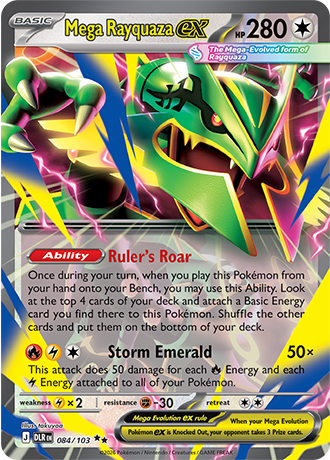
It takes a few minutes, and you can do all of it today. Still sorting out where to buy? Our guide to buying Delta Reign in the UK and US covers RRPs, store promos and which retailers have stock. For the card list and what the Japanese Mega Rayquaza ex sells for, see our Delta Reign release date and card list guide.
How to get ready for Delta Reign in three steps
- Download trace on your phone (or open it in your browser).
- Create a free account so your cards are saved and synced.
- Create a collection for your Delta Reign pulls, so release-night scans all land in one place.
Below we walk through each one, plus what to expect on Friday.
Step 1: Download trace
trace is free on iPhone and iPad and Android, and there's a web version at app.tracetcg.com for managing your cards on a bigger screen. Scanning needs the phone app, since it uses your camera.
Once it's installed, we'd grab a couple of cards you already own and scan them. You point the camera at a card and trace reads its name and collector number, then shows you the exact card, its set and its current price, usually in a couple of seconds. A practice run now means you won't be learning the scanner with a fresh Mega Rayquaza ex in your hand.
A few things that make scans quicker:
- Scan somewhere well lit, but out of direct sunlight.
- Lay the card flat, or hold it face-on to the camera rather than at an angle.
- Move in close so the card fills most of the frame, and hold still for a moment while it locks on.
- If a holo is catching the light, tilt it slightly to get rid of the glare.
Step 2: Create a free account
You can scan without an account, but you need one to save cards to a collection. It also keeps your collection synced, so cards you scan on your phone show up on the web app and on any other device you sign in on.
There's no password to set up. You can sign in with Apple, with Google, or with your email address, in which case trace emails you a sign-in link and you tap it to finish. If the email doesn't turn up within a minute or so, check your spam folder.
A free account gets you:
- one collection and one wishlist, alongside the automatic collection that holds everything you own,
- up to 100 cards,
- the current market price for every card,
- sync across your devices.
trace Pro adds price history and trend charts, unlimited collections and cards, CSV export and a few more extras, but you don't need it for release day.
Step 3: Create a collection for your Delta Reign pulls
This is the step that makes release night easier. With a collection set aside for Delta Reign, your pulls stay separate from the rest of your cards and you get a running total of what you opened.
On iPhone:
- Open the Collections tab.
- Tap the + in the top corner and choose New collection.
- Give it a name ("Delta Reign pulls" works) and leave the type as Standard.
When you scan, the bar at the bottom of the scan results says Adding to and the name of a collection. Tap Change and pick your Delta Reign collection, and everything you scan in that session goes into it.
Two things to know on the free plan. You get one collection of your own, so if you've already made one, either rename it or add your pulls there. You can also save up to 100 cards, which an Elite Trainer Box's worth of commons and Energy would eat into quickly, so our advice is to scan the hits (the ex cards, Illustration Rares and anything shiny) and leave the bulk in the box.
What to expect on release day
trace adds new sets automatically once their card data is published, so Delta Reign cards become scannable when the set lands in our catalog, around release day. Until then the scanner won't recognize them, because it can only match cards it knows about. If it doesn't find a Delta Reign card on Friday night, give it a day and try again.
Prices take a little longer to settle. Brand-new cards have very few sales behind them, and early prices swing a lot in the first week or two, so we wouldn't read too much into what your Rayquaza is "worth" on day one. Once the set's in trace you can also add the cards you're still chasing to your wishlist, which is handy if you've decided to buy singles later rather than keep opening packs.
If you get everything set up this week, all that's left on Friday is opening your packs and scanning the good stuff. Download trace on iPhone or Android, and good luck with your pulls.
FAQ
Is trace free?
Yes. trace is free to download, and a free account lets you scan cards, check current prices and track up to 100 cards in one collection and one wishlist. Pro adds price history, unlimited collections and more.
Do I need an account to scan cards?
No, scanning works without one. You do need a free account to save scanned cards to a collection and sync them between devices.
When can I scan Delta Reign cards in trace?
Once the set is added to trace's catalog, which happens automatically after the card data is published around the November 6 release. Before that, the scanner can't recognize Delta Reign cards.
When does Delta Reign come out?
Friday, November 6, 2026, in both the US and the UK. Pokémon TCG Live gets the cards a day earlier, on November 5.